The board, on every chairside PC, without a browser tab
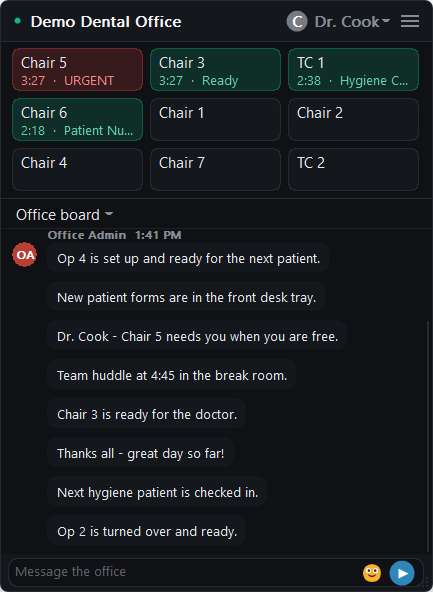
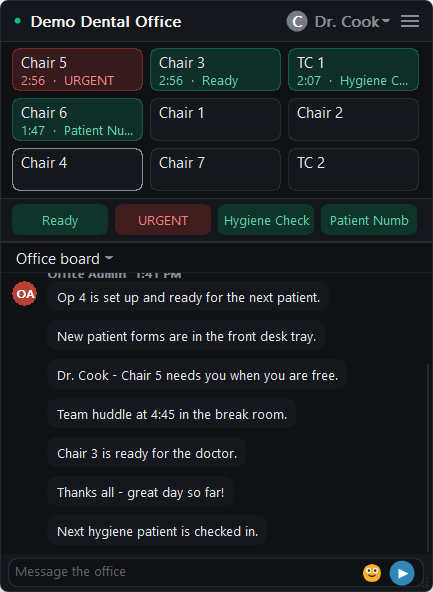
Ready.Doctor for Windows puts your chair board in a small window that stays on top of everything else on the screen - the imaging software, the chart, the schedule. When a chair needs someone, the people who care about that chair see it without switching away from what they are doing.
Built for the PC at the chair
The same live board your team uses in the browser, shaped for a screen that is busy doing something else.
Stays on top, stays out of the way
A compact window above your other programs, so the board is always visible without taking over the screen. No tab to keep open, nothing to lose behind the practice software.
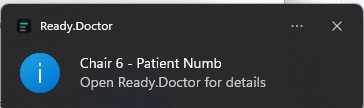
A notification when a chair needs someone
Windows pops up a notification when a chair needs attention, so it reaches you even while you are looking at something else.
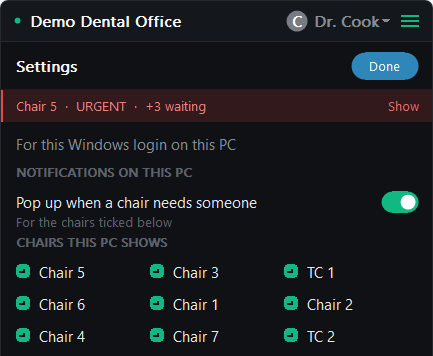
Each PC watches its own chairs
Choose which chairs a PC follows. Operatory 3 hears about Operatory 3; the front desk can follow every chair.
The office board comes with it
Read and post to the team board from the same window - "running behind", "lunch", "patient here for chair 3" - without opening anything else.
Keeps itself current
The board updates on its own within seconds of someone tapping a chair. Nobody has to refresh anything.
Starts with Windows, and keeps itself running
It comes back after a restart on its own, and if it ever stops, Windows starts it again within minutes. Nobody has to remember to open it in the morning.
Getting it on your PCs
Included with every plan
There is nothing extra to buy. Once your office is set up, your admin downloads it from inside Ready.Doctor.
No IT visit required
On PCs where staff do not have administrator rights - most clinical PCs - it can install for just the person using that PC. If your IT provider manages your machines, they can install it for everyone instead.
Sign in with your name and PIN
The same sign-in your team already uses for Ready.Doctor. Nothing new to remember.
Works on: Windows 10 (version 1809 or later) or Windows 11, 64-bit. Prefer the browser, or on a Mac or tablet? Ready.Doctor runs in any modern browser too.
Try it on your own chairs
Request access and we will set your office up with you. The Windows app is included — download it from Admin once your office is set up.